


In this article
- 1. What is the SkillsFuture AI Subscription?
- 2. Who Can Claim the Free AI Subscription?
- 3. How Do You Know If a Course Qualifies?
- 4. Which AI Tools Can You Choose From?
- 5. How Do You Redeem Your Subscription?
- 6. What If Your AI Course Doesn’t Qualify?
- 7. How Can You Make the Most of Your Six Months?
- 8. SkillsFuture AI Subscription FAQs
Finishing an AI course is the easy part. Getting good at AI takes regular practice, and the best features usually sit behind a paid plan. The SkillsFuture AI Subscription covers that cost for six months, as long as you attend the right course.
Here’s how the scheme works, who qualifies and how to claim your free subscription.
What is the SkillsFuture AI Subscription?
It’s a national initiative that gives eligible Singaporeans six months of free access to a premium AI tool after they attend a qualifying AI course. It falls under the National AI Impact Programme, which aims to build an AI-ready workforce.
Manpower Minister Dr Tan See Leng first announced the plan during the Ministry of Manpower’s Budget debate on 3 March 2026. His reasoning was simple: like learning a language, you only become fluent in AI by using it consistently and experimenting with it.
The initiative officially launched on 16 September 2026, with more than 200 eligible AI courses available from day one.
Who Can Claim the Free AI Subscription?
You’ll need to tick every box below.
| Requirement | What you need |
| Citizenship | Singapore Citizen |
| Age | 18 or above |
| Course | An AI course with the “Free AI subscription” label on MySkillsFuture |
| Course end date | 16 September 2026 or later |
| Limit | One subscription per person, no matter how many eligible courses you attend |
When the scheme was first announced, it was meant for Singaporeans aged 25 and above. The age limit was lowered to 18 at launch, so younger working adults and students can now take part too. Permanent residents and foreigners are not covered.
How Do You Know If a Course Qualifies?
Not every AI course is part of the scheme. The quickest way to check is on MySkillsFuture:
- Search for AI courses in the course directory.
- Use the filter and select the “Free AI subscription” label.
- Open the course page and confirm the label is there before you enrol.
Courses are grouped into three readiness levels: AI Aware, AI Literate and AI Fluent. If you’re unsure where you fit, take the AI Ready Quiz. It takes about 15 minutes and recommends courses based on your results.
Which AI Tools Can You Choose From?
There are five options right now, and you get to pick one.
| AI tool | What you get | Best for |
| ChatGPT Plus | OpenAI’s premium ChatGPT features with higher usage limits | Writing, research, coding and analysis |
| Google AI Pro | Gemini and other Google AI tools, with expanded usage and bundled services | People who work mostly in Gmail, Docs and Sheets |
| Manus AI | 8,000 credits a month for a general AI agent | Multi-step tasks like research, building websites and creating presentations |
| Microsoft 365 Personal | Word, Excel, PowerPoint and Outlook with built-in AI, plus 1TB of cloud storage | Office-heavy roles and everyday admin work |
| Singtel AI Pass | Six AI tools for the first three months, then one tool of your choice for the next three | Trying a few tools before settling on one |
Your pick doesn’t have to match the tool used in your course. Think about what you’ll actually use day to day. If your company runs on Microsoft, Copilot inside Office apps may be more useful than a standalone chatbot. If you’re still exploring, Singtel AI Pass lets you test a few before committing.
The list of tools and their features may change, so check the latest options when you redeem.
How Do You Redeem Your Subscription?
The process is mostly done over email.
- Complete an eligible course: Attend the full course with the “Free AI subscription” label.
- Check your inbox: You’ll get a notification email with a request form after the course.
- Choose your tool: Pick one of the five options on the form. You can’t switch once you submit, so compare them properly first.
- Submit within 60 days: The clock starts from the date of the notification email. Miss it and you may lose the benefit.
- Activate it: If your request goes through, a second email will explain how to start using your subscription.
What If Your AI Course Doesn’t Qualify?
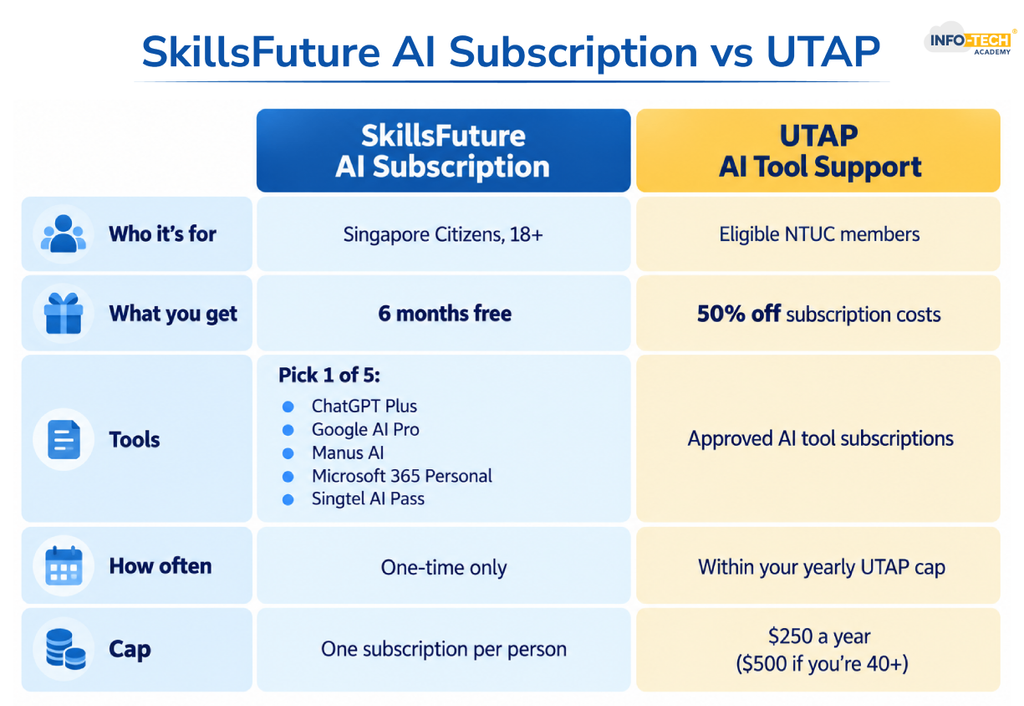
You may still be able to save on an AI subscription through UTAP claim (Union Training Assistance Programme) if you’re an NTUC member. The two schemes are separate and work quite differently.
| SkillsFuture AI Subscription | UTAP AI tool support | |
| Who it’s for | Singapore Citizens aged 18 and above | Eligible NTUC members |
| Course needed | A course with the “Free AI subscription” label | A UTAP-approved AI course |
| What you get | Six months free on one of five tools | 50% back on approved AI tool subscription costs |
| Cap | One-time benefit | Shares the UTAP annual cap of $250, or $500 if you’re 40 and above |
Also read: What UTAP Claim Means in Singapore: Online Portal Guide
AI courses at Info-Tech Academy do not carry the SkillsFuture AI Subscription label, but they are UTAP-approved and are all WSQ courses. Eligible NTUC members who complete one can claim 50% off approved AI tool subscriptions.
| Course | Ideal for |
| AI for Beginners | First-timers with little or no AI experience |
| ChatGPT course | Getting comfortable with ChatGPT for daily work and personal use |
| Smart Prompting Course | Writing effective prompts that get more useful results |
| AI Course | Using the major AI assistants at work |
| AI Course for HR | HR professionals |
| AI Course for Business Management | Managers and business owners |
How Can You Make the Most of Your Six Months?
Six months goes by quickly. A few habits help you get real value out of it:
- Pick two or three tasks you do every week, such as reports, emails or meeting notes, and run them through your AI tool.
- Save the prompts that work well so you can reuse them.
- Try features your course didn’t cover, like file analysis or deep research.
- Near the end, decide whether the tool is worth paying for. If it is, UTAP may help you cover half the cost.
By the time your free access ends, you should have a handful of AI workflows you can keep using at work.
SkillsFuture AI Subscription FAQs
Can I get a free AI subscription in Singapore?
Yes, if you’re a Singapore Citizen aged 18 or above. Under the SkillsFuture AI Subscription, launched on 16 September 2026, you get six months of free access to a premium AI tool after completing an eligible AI course.
Can I redeem more than one free AI subscription?
No. Each eligible Singaporean can redeem only one free six-month AI subscription, however many eligible courses they attend. Taking a second labelled course won’t unlock another subscription or extend your six months.
How do I know whether an AI course qualifies for the initiative?
Look for the “Free AI subscription” label on the course listing in MySkillsFuture. Any course showing this label qualifies.
Is the SkillsFuture AI Subscription the same as UTAP support for AI tool subscriptions?
No, they’re two separate schemes. The SkillsFuture AI Subscription gives Singapore Citizens aged 18+ six free months of a premium AI tool after a labelled course. UTAP lets eligible NTUC members claim 50% of approved AI subscription costs after a UTAP-approved course, within their annual $250 cap ($500 if 40+).

Transforming thoughts and concepts into clear, compelling words is a powerful tool that connects people. While writing boosts my creativity, reading broadens my perspective and sharpens my understanding of language and narration.