


In this article
- 1. What Is Power BI?
- 2. Why Is Power BI Gaining Popularity?
- 3. Is Power BI Worth Learning in Singapore?
- 4. Is Power BI Hard To Learn?
- 5. Which is Better: Power BI Or Excel?
- 6. Who Should Learn Power BI?
- 7. Can You Learn Power BI By Yourself?
- 8. Is Power BI Training Singapore Worth It?
- 9. Power BI Training FAQs
What Is Power BI?
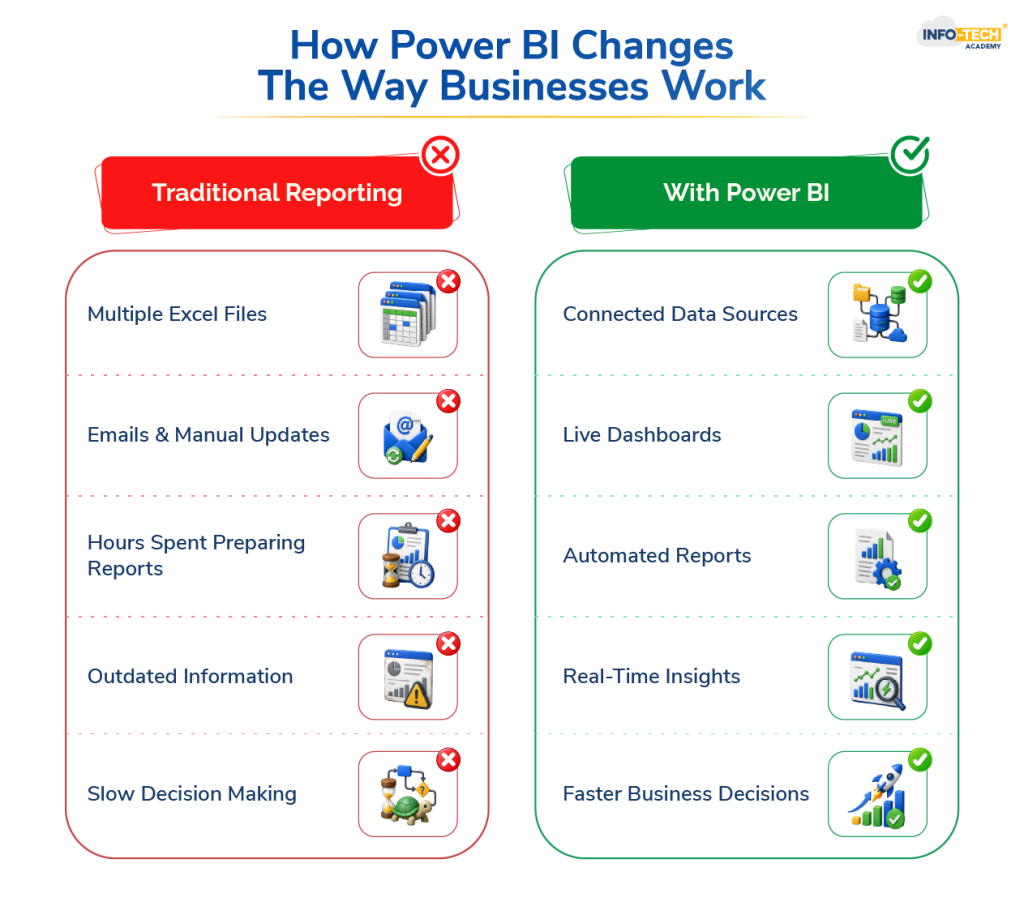
Most people don’t hear about Power BI because they’re looking for a new skill. They hear about it because something at work is becoming a headache. A report takes too long to prepare. Different departments are working with different numbers. Management wants answers quickly, but the required data is spread across spreadsheets, systems, and emails. Power BI training is learning Microsoft’s reporting and dashboard tool. It pulls information together and presents it in a way that’s easier to understand.
In reality, people like it because it reduces reporting pain.
Why Is Power BI Gaining Popularity?
A few years ago, Power BI was mostly associated with analysts. Now it’s everywhere.
Talk to someone in finance, and there’s a good chance they’ve seen a Power BI dashboard. Speak with a sales manager, and they may already be using it to track targets. Even HR teams are starting to use reporting dashboards to monitor recruitment and workforce trends. This shift happened quietly.
Companies started collecting more information than they knew what to do with. Eventually, spreadsheets stopped being enough for certain tasks. Then Power BI arrived at the right time.
Is Power BI Worth Learning in Singapore?
For many professionals, yes. Not because every company is asking for it, or it guarantees a promotion. But because workplaces are changing.
Employers increasingly value people who can explain what’s happening in the business, not just people who can gather information. That’s where Power BI fits in. It helps turn numbers into something useful.
If your work involves reports, targets, budgets, performance tracking, or decision-making, there’s a good chance the skill will be useful sooner rather than later.
Is Power BI Hard To Learn?
The honest answer is: It’s not as easy as learning a new mobile app and it’s also nowhere near as difficult as people imagine.
The biggest surprise for many beginners is that the challenge isn’t Power BI itself. The challenge is understanding data.
You’ll probably spend more time figuring out why the numbers don’t match than learning where to click. That’s normal.
Once people stop worrying about the software and start focusing on the information, progress usually comes much faster.
Which is Better: Power BI Or Excel?
This question comes up all the time. The strange thing is that it’s not really a competition.
Most companies still use Excel every day. In fact, many Power BI users continue working with Excel regularly.
The difference is that the two tools solve different problems. Excel is great when you’re working with calculations, spreadsheets, and smaller datasets. Power BI becomes useful when information starts coming from multiple places and reporting becomes more complicated.
Think of Excel as the place where work often begins and Power BI as the place where that information gets turned into dashboards and business reports.
| Excel | Power BI |
|---|---|
| Spreadsheets | Dashboards |
| Manual updates | Automated updates |
| Static reports | Interactive reports |
| Smaller datasets | Larger datasets |
Who Should Learn Power BI?
One thing that surprises many people is how varied Power BI users are. They’re not all analysts. A finance executive might use it to review spending. A sales manager could use it to monitor performance across different teams. An operations manager may track productivity. A business owner might simply want a clearer picture of what’s happening without opening ten different reports.
The common factor isn’t the job title. It’s the need to understand information more quickly.
Can You Learn Power BI By Yourself?
You can. Plenty of people start that way.
The internet is full of tutorials, videos, blogs, and free resources. The problem is that learning Power BI and learning random Power BI features are not the same thing. Many beginners spend weeks watching tutorials but never build anything meaningful themselves.
They know what a dashboard looks like. They know a few formulas. But they don’t quite know how everything connects together.
That’s often the point where structured learning starts to make sense.
Is Power BI Training Singapore Worth It?
For someone who uses reports regularly, it often is. Not because a course teaches secret techniques. And not because you can’t learn online. The real advantage is having a clear path.
Instead of jumping between disconnected tutorials, you learn how reporting actually works from start to finish. You work with data, build dashboards, make mistakes, fix them, and gradually become more comfortable with the process. That’s usually how confidence develops.
If you’re exploring Power BI training in Singapore, look for a WSQ course that focuses on practical work rather than just software demonstrations. Learning Power BI is one thing. Learning how it’s used in real workplaces is something else entirely.
Info-Tech’s Power BI Data Analysis Course is designed around that idea. Rather than overwhelming beginners with technical jargon, the focus is on helping learners build useful reporting skills they can apply in their day-to-day work. Get enrolled today!
Power BI Training FAQs
Can I learn Power BI in 2 days?
Yes, you can learn the fundamentals of Power BI in 2 days, including creating dashboards, visualizations, and basic reports. However, building confidence with real-world projects and advanced features takes additional practice and experience.
How much does it cost to learn Power BI?
The cost of learning Power BI depends on the training format, course depth, certification options, and whether funding support is available. Many learners reduce their training expenses through government-supported upskilling initiatives and employer-sponsored training programmes.
Can I learn Power BI on my own?
Yes, you can learn Power BI on your own using online tutorials, documentation, and practice projects. However, a structured course can help you learn faster by providing a clear roadmap, hands-on exercises, and guidance on real-world reporting scenarios.
Is Power BI 100% free?
No, Power BI is not entirely free. While Power BI Desktop can be downloaded and used for free, certain features such as cloud sharing, collaboration, and advanced business capabilities require a paid subscription.

Transforming thoughts and concepts into clear, compelling words is a powerful tool that connects people. While writing boosts my creativity, reading broadens my perspective and sharpens my understanding of language and narration.