


In this article
- 1. What is Absentee Payroll Funding?
- 2. Who Can Claim Absentee Payroll Funding?
- 3. How Much Absentee Payroll Funding Can You Receive?
- 4. Do You Need to Apply Before the Course Starts?
- 5. What Should You Set Up Before Making the Claim?
- 6. How Do You Submit the AP Declaration?
- 7. How Can You Check Whether the Claim Was Paid?
- 8. What Can Delay an Absentee Payroll Claim?
- 9. Is Absentee Payroll Funding Worth Claiming?
- 10. Absentee Payroll Funding FAQs
Sending an employee for training sounds simple until you consider the time they spend away from their usual work. The course fee may be subsidised, but the employee is still on payroll. This is where Absentee Payroll Funding comes in.
For eligible employer-sponsored training in Singapore, Absentee Payroll, or AP Funding, helps employers offset part of the manpower cost while employees attend approved training. The claim process is also less manual than it may first appear. In most cases, your training provider starts the process and your company completes the declaration later.
What is Absentee Payroll Funding?
Absentee Payroll Funding is support for employers that send employees for eligible, certifiable skills training. It does not replace the employee’s salary. The employee continues to be employed and paid while attending training, while the funding helps the business recover part of the manpower cost associated with those training hours.
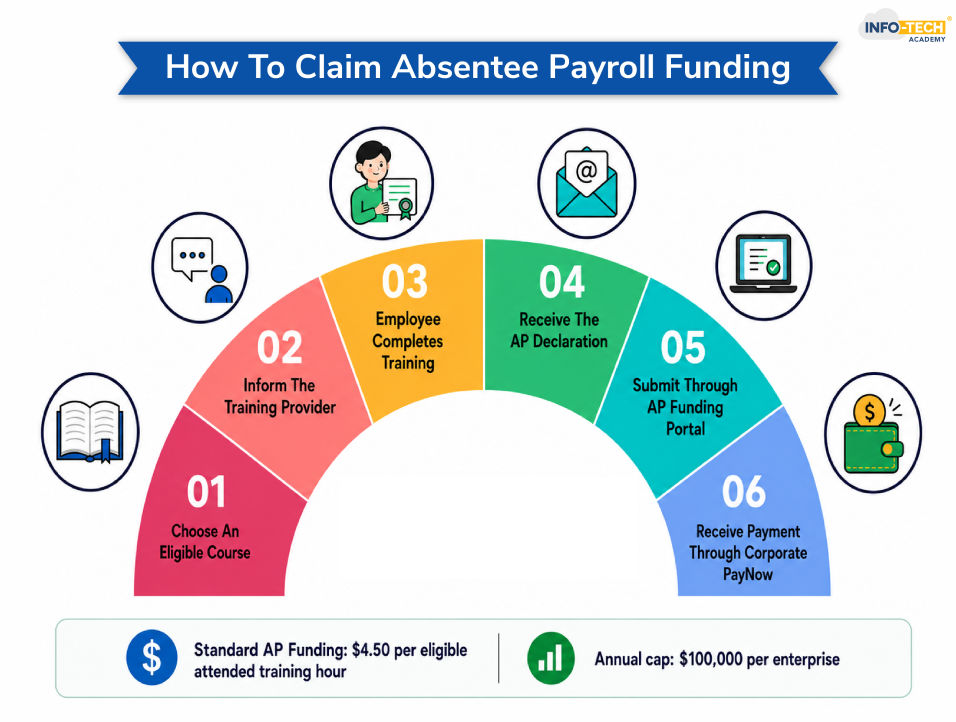
For courses under the prevailing general AP rate, funding is S$4.50 for each attended training hour, subject to a S$100,000 cap per enterprise per calendar year. The amount is based on the trainee’s actual attended hours rather than simply the scheduled length of the course.
Who Can Claim Absentee Payroll Funding?
The employer needs to be registered or incorporated in Singapore, and the course must be an eligible SWDA-funded course available through the Course Directory for Business.
The employee being sponsored generally needs to be a Singapore Citizen, Permanent Resident or eligible Long Term Visit Pass Plus holder. The employer must fully sponsor the employee for the relevant training costs and make the required CPF contributions.
There are also conditions tied to the training itself. The employee should remain employed and continue receiving salary while attending the course. Where assessments apply, the necessary course and assessment requirements must also be met.
Training outside normal working hours needs a little more attention. AP Funding in such cases is intended to offset overtime pay or the applicable allowance paid to employees, so the employer needs an appropriate HR policy and must actually make that payment. AP Funding does not cover on-the-job training hours.
Read also: What UTAP Claim Means in Singapore: Online Portal Guide
How Much Absentee Payroll Funding Can You Receive?
For most eligible courses starting on or after 1 January 2022, the standard AP rate has been straightforward:
S$4.50 × eligible attended training hours
The overall claim is capped at S$100,000 per enterprise each calendar year. The cap is applied using the enterprise’s UEN and is based on when the funding is disbursed.
There is separate enhanced support under Workfare Skills Support (WSS). Employers sponsoring workers who meet the current WSS conditions may receive AP Funding of up to 95% of the employee’s hourly basic salary, capped at S$13 per training hour. WSS eligibility was updated from July 2026.
Do You Need to Apply Before the Course Starts?
Usually, no separate AP application is required before training. You just have to inform the training provider that you are employer-sponsored and that you intend to claim AP Funding. The training provider submits the trainee’s enrolment through the training system.
Once the course and the necessary processing have been completed, your company will receive an email when the AP Declaration is ready for action. This email matters. Completing the course does not mean that the declaration will appear immediately, so there may be a gap between the end of training and the notification.
Read also: What is SSG Funding: SWDA Singapore
What Should You Set Up Before Making the Claim?
Two things are worth checking early: Corppass access and Corporate PayNow.
Someone in the organisation needs the appropriate Corppass access for the AP Funding e-Service. The current onboarding guide instructs the organisation’s Corppass administrator to assign an authorised user to the relevant EPJS Enterprise User role so that the person handling SSG and WSG transactions can submit the AP Declaration.
Your PayNow details should also be correct. AP disbursements are paid to the company’s Corporate PayNow account, and the PayNow UEN details can be updated through the profile section of the e-Service when necessary.
Sorting these out before the declaration arrives saves unnecessary back-and-forth later.
How Do You Submit the AP Declaration?
Once you receive the notification, log in to the Absentee Payroll Funding e-Service and open the AP Funding section. Your dashboard will show courses that need action. Select the relevant course title to open its Absentee Payroll Declaration.
Check the course and trainee information carefully. The declaration page will indicate what salary or working-hour information is required for the employees concerned. For the standard flat-rate AP Funding applicable to newer courses, some salary fields may not always be required, while additional information can still be needed for cases such as WSS claims. Select the employees you are claiming for, complete the required declarations and submit.
One small detail is easy to miss: the e-Service allows only one saved AP Declaration draft at a time. Saving another draft can overwrite the previous one, so it is better not to leave several declarations half-finished.
Read also: SkillsFuture Credit: Eligibility and How to Claim It
How Can You Check Whether the Claim Was Paid?
The AP Funding dashboard shows the progress of your declarations.
A claim may appear ‘Pending’ while eligibility checks or your company’s declaration are outstanding. After submission, it can move into processing. Once the funding has been disbursed, the status will show as ‘Paid’.
For an approved claim, the official guidance states that the funding is generally disbursed to the company’s Corporate PayNow within about two and a half weeks after submission.
What Can Delay an Absentee Payroll Claim?
Many delays are fairly ordinary. The training provider may still be updating attendance or assessment information, the AP Declaration may still be waiting for your company, or the PayNow details may need attention.
Problems are also more likely when the wrong company UEN is provided during enrolment, especially where a group has several related entities. The UEN supplied should belong to the employer that actually employs and pays the trainee. The official onboarding process uses that information when verifying the funding and disbursement.
So before chasing a missing payment, check the AP dashboard first and speak to the training provider if the course is still waiting on eligibility or training-related information.
Is Absentee Payroll Funding Worth Claiming?
For one short course, S$4.50 an hour may not look significant. Across several employees and multiple training programmes, however, those claims can add up. More importantly, AP Funding deals with a cost that course-fee subsidies do not: the employee’s time away from regular work.
For employers already investing in approved staff training, claiming the support available is simply part of managing the full cost of upskilling properly. A quick check of course eligibility, Corppass access and PayNow details before training can make the eventual claim much easier.
A top training provider in Singapore will be eligible to provide subsidies claim and lower the financial burden on the employee or the employer. Through that, you can very well complete the courses in trend: AI course for beginners, AI course, leadership course, Power BI for Data Analysis course.
Absentee Payroll Funding FAQs
What is an absentee payroll?
Absentee payroll is funding that helps employers offset part of the wage cost when employees attend approved training during working hours.
How much is absentee payroll?
For eligible courses, Absentee Payroll Funding is $4.50 per attended training hour, capped at $100,000 per enterprise per calendar year.
How to apply for absentee payroll in Singapore?
In Singapore, the training provider starts the Absentee Payroll claim process after enrolling the employee. Once the AP Declaration is ready, the employer receives an email, logs in to the AP Funding e-Service using Corppass, submits the required employee details, and receives approved funding through Corporate PayNow.
What types of training are covered by absentee payroll funding?
Absentee Payroll Funding covers eligible certifiable skills training courses supported under Singapore’s workforce training schemes. It applies to approved training attended by employees, but does not cover on-the-job training (OJT) hours.

Transforming thoughts and concepts into clear, compelling words is a powerful tool that connects people. While writing boosts my creativity, reading broadens my perspective and sharpens my understanding of language and narration.